
In most traditional programming environments, code executes strictly line-by-line: when a program requests data across the internet or reads a large file from disk, execution freezes entirely until the operation finishes. If JavaScript functioned this way inside web browsers, clicking a button or requesting an image would freeze your mouse cursor and render the webpage completely unresponsive.
JavaScript prevents browser freezing through an architectural model known as asynchronous, non-blocking I/O. Instead of halting execution while waiting for slow network servers, JavaScript delegates the time-consuming operation to background browser engines, continues executing immediate user interface animations, and handles the returned data only when it becomes available. In our foundational guide on JavaScript functions and execution flow, functions represent discrete units of logic; asynchronous JavaScript dictates when those units run.
In this comprehensive guide, you will master the underlying mechanics of asynchronous JavaScript, demystify the Event Loop, understand how Promises transition between lifecycle states, and write clean, elegant asynchronous routines using modern async and await syntax.
- 1. Why Asynchronous JavaScript Exists (Synchronous vs Asynchronous)
- 2. The Engine Under the Hood: Event Loop & Microtask Queue
- 3. The History: How Callbacks Led to “Callback Hell”
- 4. Demystifying Promises: The 3 Lifecycle States
- 5. Consuming Promises with .then(), .catch(), and .finally()
- 6. Mastering Modern async/await Syntax
- 7. Error Handling: Bulletproof try/catch Patterns
- 8. Running Promises Concurrently: Promise.all() vs Promise.allSettled()
- 9. Practical Real-World Tutorial: Fetching Live REST API Data
- 10. Common Beginner Mistakes & How to Avoid Them
- 11. Frequently Asked Questions (FAQ)
1. Why Asynchronous JavaScript Exists (Synchronous vs Asynchronous)
To grasp asynchronous programming, you must first understand the fundamental constraint of the JavaScript runtime: JavaScript is single-threaded. It possesses exactly one Call Stack, meaning it can only compute one instruction at any given millisecond.
Consider what occurs in a purely synchronous paradigm:
// Synchronous Execution (Blocking)
console.log("Step 1: User clicks search button");

// Imagine a synchronous HTTP request that takes 2.5 seconds to complete
const results = fetchSearchResultsSync(); // Browser UI FREEZES here for 2.5s!

console.log("Step 2: Render results to the screen");
console.log("Step 3: User scrolls down page");
During those 2.5 seconds, the browser cannot repaint the screen, register keystrokes, or respond to hover effects. The page appears broken or crashed. As described in our tutorial on how programming computers actually works, CPUs operate at nanosecond frequencies, making network latencies feel like an eternity.
Asynchronous execution resolves this by offloading the waiting period:
// Asynchronous Execution (Non-Blocking)
console.log("Step 1: User clicks search button");

// Offload the network request to browser Web APIs
fetchSearchResultsAsync().then(results => {
  console.log("Step 2: Render results to the screen (arrived later)");
});

// Execution continues IMMEDIATELY without waiting!
console.log("Step 3: User scrolls down page (UI remains 60fps smooth)");
The console output immediately logs Step 1 and Step 3; Step 2 logs only when the network packets arrive. The browser UI never drops a single frame.
2. The Engine Under the Hood: Event Loop & Microtask Queue
How does a single-threaded language juggle multiple background operations simultaneously? The secret lies in the coordination between four components of the browser environment:
- Call Stack: The Last-In, First-Out (LIFO) execution stack where functions are pushed when called and popped when they return.
- Web APIs (Browser Platform): Native multi-threaded C++ subsystems provided by the browser (such as
fetch(),setTimeout(), and DOM Event listeners). These run concurrently in background OS threads. - Microtask Queue (High Priority): The dedicated queue where Promise resolution handlers (
.then(),.catch(), and resumedawaitpoints) wait for execution. - Macrotask / Callback Queue: The standard queue where timer callbacks (like
setTimeout) and UI events wait. - The Event Loop: A continuous supervisor loop that constantly monitors the Call Stack. When and only when the Call Stack is completely empty, the Event Loop drains the Microtask Queue first, then picks the oldest task from the Macrotask Queue.
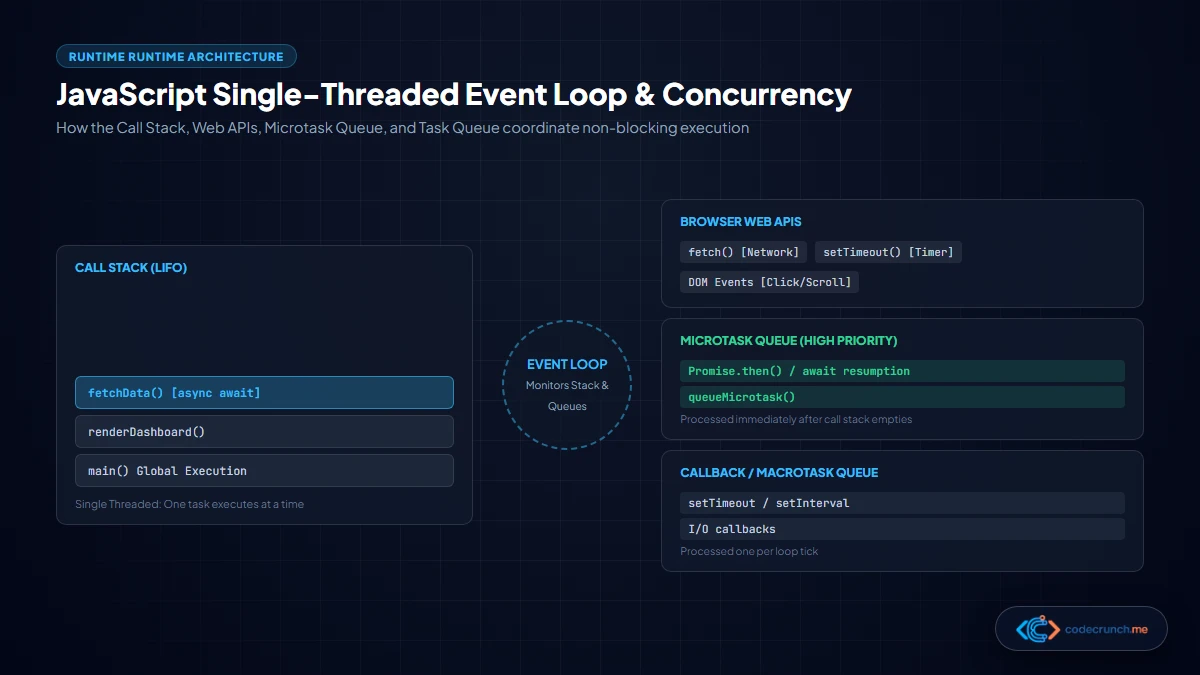
This explains why Promise callbacks consistently execute before setTimeout(..., 0) callbacks. According to the MDN Web Docs Promise Specification, microtasks possess unconditional execution priority over standard macrotasks.
3. The History: How Callbacks Led to “Callback Hell”
Before ES6 (ECMAScript 2015), asynchronous JavaScript relied exclusively on callback functions. A callback is simply a function passed as an argument to another function, intended to be invoked when an asynchronous task finishes.
While simple for single operations, real-world web applications frequently require dependent sequential tasks: fetch a user record, then fetch their orders, then fetch payment details for each order, then render the invoice. With callbacks, each sequential step required another level of indentation:
// The Infamous "Pyramid of Doom" (Callback Hell)
getUserProfile(userId, function(err, user) {
  if (err) {
    handleError(err);
  } else {
    getUserOrders(user.orderId, function(err, orders) {
      if (err) {
        handleError(err);
      } else {
        getOrderInvoice(orders[0].id, function(err, invoice) {
          if (err) {
            handleError(err);
          } else {
            renderInvoice(invoice);
          }
        });
      }
    });
  }
});
This nested structure—often termed the “Pyramid of Doom”—suffers from severe defects: it is arduous to read, violates natural cognitive flow, makes code re-use challenging, and requires repetitive error handling at every single tier.
4. Demystifying Promises: The 3 Lifecycle States
To eliminate callback hell, ECMAScript 2015 introduced Promises. A Promise is a first-class JavaScript object that serves as a placeholder for a value that is unknown now, but will be resolved at some point in the future (or fail gracefully).
At any given moment, a Promise exists in exactly one of three immutable lifecycle states:
- 1. Pending: The initial state. The asynchronous operation has initiated and is currently in progress. The eventual value is undefined.
- 2. Fulfilled (Resolved): The operation succeeded. The Promise produces a resulting value, and any attached
.then()callbacks are triggered. - 3. Rejected: The operation encountered an error or network exception. The Promise produces a reason (error object), and any attached
.catch()callbacks are triggered.
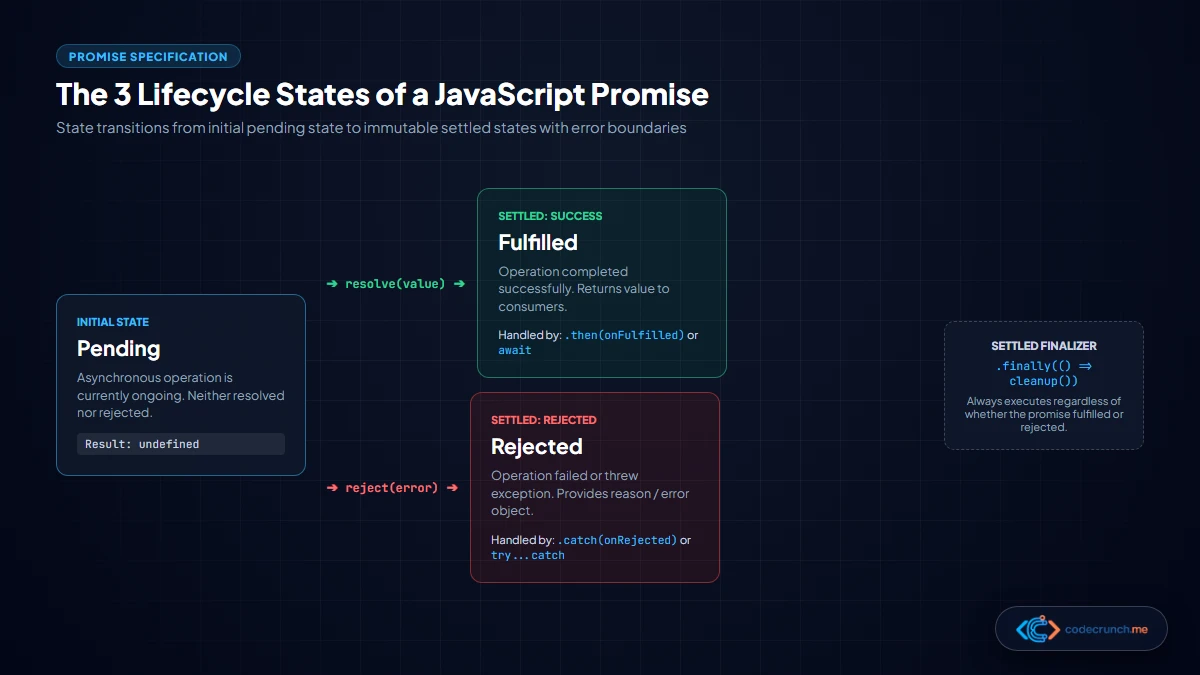
Crucially, a Promise can only settle once. Once a Promise enters either the Fulfilled or Rejected state, it is permanently locked and cannot transition again. This immutability prevents race conditions and duplicate callback executions.
Here is how you construct a custom Promise from scratch:
// Creating a Promise wrapper for delayed execution
function checkServerStatus(isServerHealthy) {
  return new Promise((resolve, reject) => {
    console.log("Pinging remote cluster...");

    setTimeout(() => {
      if (isServerHealthy) {
        resolve({ status: 200, latency: "42ms" }); // Transitions to Fulfilled
      } else {
        reject(new Error("Connection timed out after 3000ms")); // Transitions to Rejected
      }
    }, 1000);
  });
}
5. Consuming Promises with .then(), .catch(), and .finally()
Once a function returns a Promise, consumers attach handler callbacks using three standardized instance methods:
.then(onFulfilled): Executes when the Promise resolves successfully. Crucially, whatever you return from inside a.then()callback is automatically wrapped into a brand-new Promise, allowing elegant method chaining..catch(onRejected): Acts as a centralized error boundary. Any uncaught exception or rejected Promise anywhere up the chain bubbles down to the nearest.catch()block..finally(onSettled): Executes unconditionally once the Promise settles (regardless of whether it succeeded or failed). Ideal for cleanup routines like hiding loading spinners or closing database connections.
Witness how Promise chaining flattens our earlier invoice example into a linear, readable sequence:
// Clean Promise Chaining
getUserProfile(userId)
  .then(user => getUserOrders(user.orderId))
  .then(orders => getOrderInvoice(orders[0].id))
  .then(invoice => renderInvoice(invoice))
  .catch(err => {
    // Single centralized error handler catches failures in ANY preceding step!
    console.error("Pipeline failure:", err.message);
  })
  .finally(() => {
    hideLoadingSpinner();
  });
6. Mastering Modern async/await Syntax
While Promise chaining marked a monumental leap forward, writing chains of .then() callbacks can still feel verbose when passing values across multiple nested scopes. In ES2017, JavaScript introduced async and await.
It is vital to understand that async/await is not a different technology from Promises—it is elegant syntactic sugar built directly on top of Promises and generators. It allows developers to write asynchronous code that visually reads like synchronous, linear code.
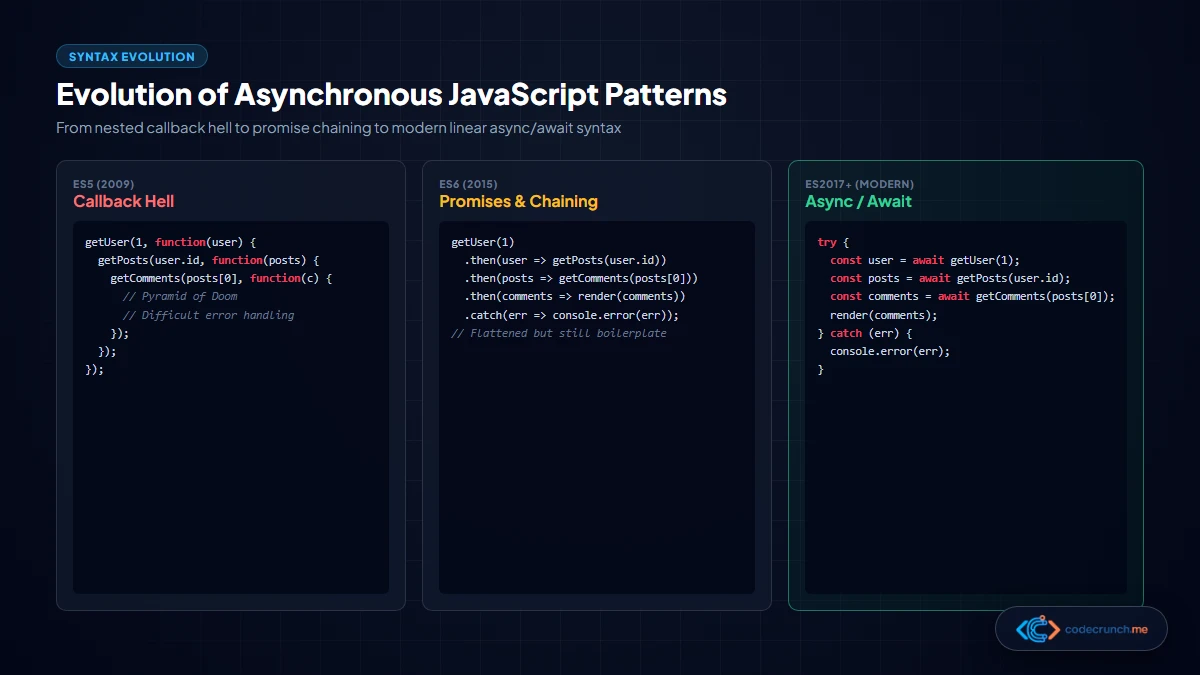
The rules of async and await are straightforward:
- The
asyncKeyword: Placed before a function declaration. Marking a function asasyncguarantees that it will always return a Promise. If you return a primitive value likereturn 42, JavaScript automatically wraps it inPromise.resolve(42). - The
awaitKeyword: Can only be used inside anasyncfunction (or at the top level of modern ES modules). When placed before a Promise,awaitpauses the execution of the surroundingasyncfunction until the Promise settles. Meanwhile, other scripts and browser animations outside the function continue running smoothly!
// Modern, intuitive async/await syntax
async function loadInvoiceData(userId) {
  try {
    showLoadingSpinner();

    // Line execution pauses here until user resolves, without freezing browser
    const user = await getUserProfile(userId);

    // Then pauses here for orders
    const orders = await getUserOrders(user.orderId);

    // Then pauses here for invoice
    const invoice = await getOrderInvoice(orders[0].id);

    renderInvoice(invoice);
  } catch (err) {
    console.error("Failed to load invoice:", err.message);
  } finally {
    hideLoadingSpinner();
  }
}
7. Error Handling: Bulletproof try/catch Patterns
With Promises and .then(), errors were caught using .catch(). With async/await, you handle errors using standard JavaScript try...catch blocks, unifying synchronous and asynchronous error handling.
When an awaited Promise rejects, it throws an exception at that exact line. If that exception is enclosed within a try block, control immediately transfers to the corresponding catch block:
async function safeApiRequest(endpoint) {
  try {
    const response = await fetch(endpoint);

    // IMPORTANT: fetch() only rejects on network failures, NOT on 404/500 errors!
    if (!response.ok) {
      throw new Error(`Server returned HTTP ${response.status}: ${response.statusText}`);
    }

    const data = await response.json();
    return { success: true, payload: data };
  } catch (error) {
    // Catches network dropouts, HTTP status errors, and JSON parse failures
    console.warn(`API request to ${endpoint} aborted:`, error.message);
    return { success: false, error: error.message };
  }
}
8. Running Promises Concurrently: Promise.all() vs Promise.allSettled()
One of the most catastrophic beginner performance mistakes is awaiting independent Promises sequentially. If you need to fetch three unrelated pieces of data (e.g. weather, stock quotes, and user profile), awaiting them one after another creates an artificial bottleneck:
// SLOW: Sequential Execution (Takes 1.0s + 1.2s + 0.8s = 3.0 seconds total!)
const weather = await fetchWeather();      // Waits 1.0s
const stocks  = await fetchStocks();       // Waits 1.2s
const profile = await fetchUserProfile();  // Waits 0.8s
Because these operations do not depend on one another, they should be fired concurrently in parallel using Promise.all(). In our guide on JavaScript loop optimization, parallelizing independent tasks is key to high-throughput execution:
// FAST: Concurrent Execution (Takes only 1.2s total — the longest single request!)
const [weather, stocks, profile] = await Promise.all([
  fetchWeather(),
  fetchStocks(),
  fetchUserProfile()
]);| Promise Combinator | Settlement Behavior | Best Used When |
|---|---|---|
Promise.all() | Fulfills when ALL promises fulfill. Rejects immediately if any single promise rejects (“fail-fast”). | All operations are strictly interdependent and cannot proceed if one fails. |
Promise.allSettled() | Waits for ALL promises to complete, regardless of fulfillment or rejection. Returns an array of status objects. | Independent batch tasks where partial success is acceptable (e.g. dashboard widgets). |
Promise.race() | Settles as soon as the FASTEST promise settles (fulfills or rejects). | Implementing request timeout watchdogs. |
Promise.any() | Fulfills as soon as the first promise FULFILLS. Ignores rejections until all reject. | Querying multiple mirror servers to pick the fastest successful response. |
9. Practical Real-World Tutorial: Fetching Live REST API Data
Let us synthesize these concepts by creating a complete, production-grade frontend data-fetching utility. We will query GitHub’s public API to retrieve user metadata, calculate repository statistics, and gracefully handle rate limiting.
// github-explorer.js
async function inspectGitHubUser(username) {
  const profileUrl = `https://api.github.com/users/${encodeURIComponent(username)}`;
  const reposUrl = `https://api.github.com/users/${encodeURIComponent(username)}/repos?per_page=5&sort=updated`;

  try {
    console.log(`Fetching telemetry for ${username}...`);

    // Initiate both network requests concurrently
    const [profileRes, reposRes] = await Promise.all([
      fetch(profileUrl),
      fetch(reposUrl)
    ]);

    // Validate HTTP status boundaries
    if (profileRes.status === 404) {
      throw new Error(`User '${username}' was not found on GitHub.`);
    }
    if (!profileRes.ok || !reposRes.ok) {
      throw new Error(`GitHub API returned rate-limit or service error.`);
    }

    // Parse JSON streams concurrently
    const [profile, repos] = await Promise.all([
      profileRes.json(),
      reposRes.json()
    ]);

    // Format human-readable summary
    return {
      username: profile.login,
      name: profile.name || "No public name",
      bio: profile.bio || "No bio provided",
      publicRepos: profile.public_repos,
      followers: profile.followers,
      recentProjects: repos.map(repo => ({
        name: repo.name,
        stars: repo.stargazers_count,
        url: repo.html_url
      }))
    };
  } catch (err) {
    console.error("GitHub inspection error:", err.message);
    throw err; // Re-throw to caller for UI notification
  }
}

// Example Invocation
inspectGitHubUser("torvalds")
  .then(data => console.log("Developer Profile:", data))
  .catch(err => alert(err.message));
As documented in MDN Web Docs async function guidance, structured error propagation coupled with concurrent Promise.all() ensures robust, responsive client-side code.
10. Common Beginner Mistakes & How to Avoid Them
| Mistake Pattern | Why It Breaks | Corrected Code Pattern |
|---|---|---|
Forgetting await | Assigns the pending Promise object instead of the resolved data: const data = fetch(). | Always add await: const res = await fetch(). |
Awaiting inside forEach() | Array.prototype.forEach is not promise-aware; it runs iterations synchronously and ignores returns. | Use a modern for...of loop or map items to an array with Promise.all(arr.map(async ...)). |
Assuming fetch() rejects on 404/500 | fetch() only rejects on physical network failures. HTTP 404 and 500 resolve normally. | Check the response.ok boolean property before parsing body JSON. |
Missing try/catch blocks | Uncaught Promise rejections trigger unhandled rejection warnings and can crash Node.js processes. | Wrap awaited operations in try/catch or chain a terminal .catch() handler. |
11. Frequently Asked Questions (FAQ)
Does async/await make JavaScript multi-threaded?
No. JavaScript remains strictly single-threaded. When you use await, JavaScript does not spin up a second CPU core for your function. Instead, it pauses the execution of that specific function and yields CPU time back to the Event Loop, allowing other tasks on the main thread to execute until the awaited Promise resolves.
What happens if I return a value from an async function without await?
Because an async function always returns a Promise, any return statement (such as return "Hello") automatically wraps the value in a resolved Promise: Promise.resolve("Hello"). The calling code must consume it using await or .then().
Should I convert all Promise chains to async/await?
In modern production codebases, async/await is preferred for 95% of asynchronous routines due to its clean linear readability, standard try/catch error handling, and ease of debugging. However, methods like Promise.all(), Promise.race(), and Promise.allSettled() are still heavily utilized alongside await to manage concurrent tasks.
Can I use await outside of an async function?
In modern JavaScript running in ES Modules (files with <script type="module"> in browsers or "type": "module" in Node.js package.json), you can use Top-Level Await directly at the root scope of the file without wrapping it in an async function. In legacy CommonJS scripts or standard function scopes, await requires an enclosing async function.