
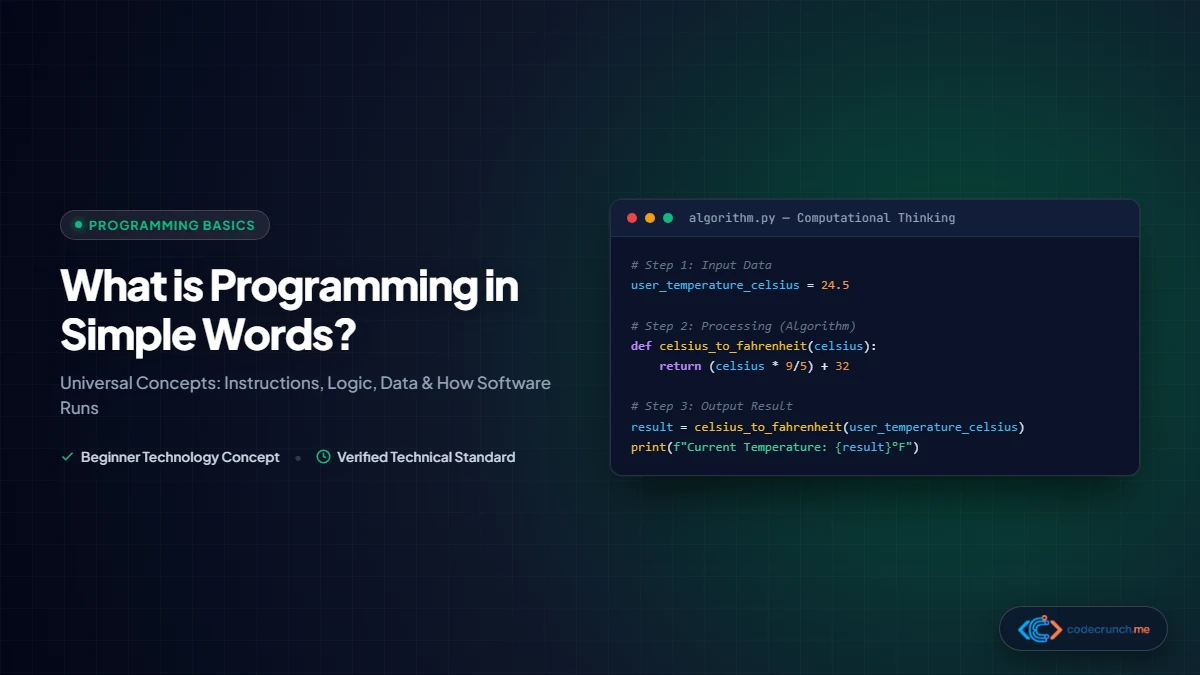
Whenever you open a smartphone app, use a search engine, play a video game, or adjust a smart thermostat, you are interacting with computer code. But what is programming in simple words, and how does human-written text turn into functioning digital technology?
In short: programming is the art of giving clear, unambiguous instructions to a computer to solve problems and automate tasks. Just as a chef follows a recipe or a musician reads sheet music, computers follow precise code written in specialized programming languages. In this comprehensive beginner guide, we break down core concepts, explain how compilers and interpreters work, compare popular languages, and provide a clear path to writing your very first program in 2026.
Table of Contents
- 1. What Is Programming? (The Simple Explanation)
- 2. The Recipe Analogy: How Computers Think
- 3. The 5 Core Building Blocks of Every Computer Program
- 4. How Code Executes: From Human Syntax to Binary Ones and Zeros
- 5. Compilers vs Interpreters Explained
- 6. Popular Programming Languages Compared
- 7. Code in Action: “Hello World” Across Three Languages
- 8. Real-World Applications: Where Programming Powers Society
- 9. How Beginners Can Start Coding Today
- 10. Frequently Asked Questions (FAQ)
1. What Is Programming? (The Simple Explanation)
Programming (often called software development or coding) is the process of designing, writing, testing, and maintaining instructions that tell a computer what to do. While humans can interpret vague or ambiguous directions based on intuition and context, computers have no imagination. A computer will do exactly what you tell it to do—nothing more, and nothing less.
To see how engineers apply programming across the internet ecosystem, explore our guide on what does a web developer do.
2. The Recipe Analogy: How Computers Think
The clearest way to grasp programming logic is through a culinary recipe. Imagine giving someone instructions to brew a cup of hot tea:
- Fill the kettle with 250ml of cold water.
- Place the kettle on the stove and heat until boiling (100°C).
- Place one tea bag into a ceramic mug.
- Pour the boiling water over the tea bag.
- Wait 3 minutes for steeping.
- Remove the tea bag and serve.
Notice the sequence: each step builds upon the previous one. If you swap step 4 and step 1 (pouring water before boiling it), the outcome fails. In software engineering, this ordered sequence of logical steps is called an algorithm.
3. The 5 Core Building Blocks of Every Computer Program
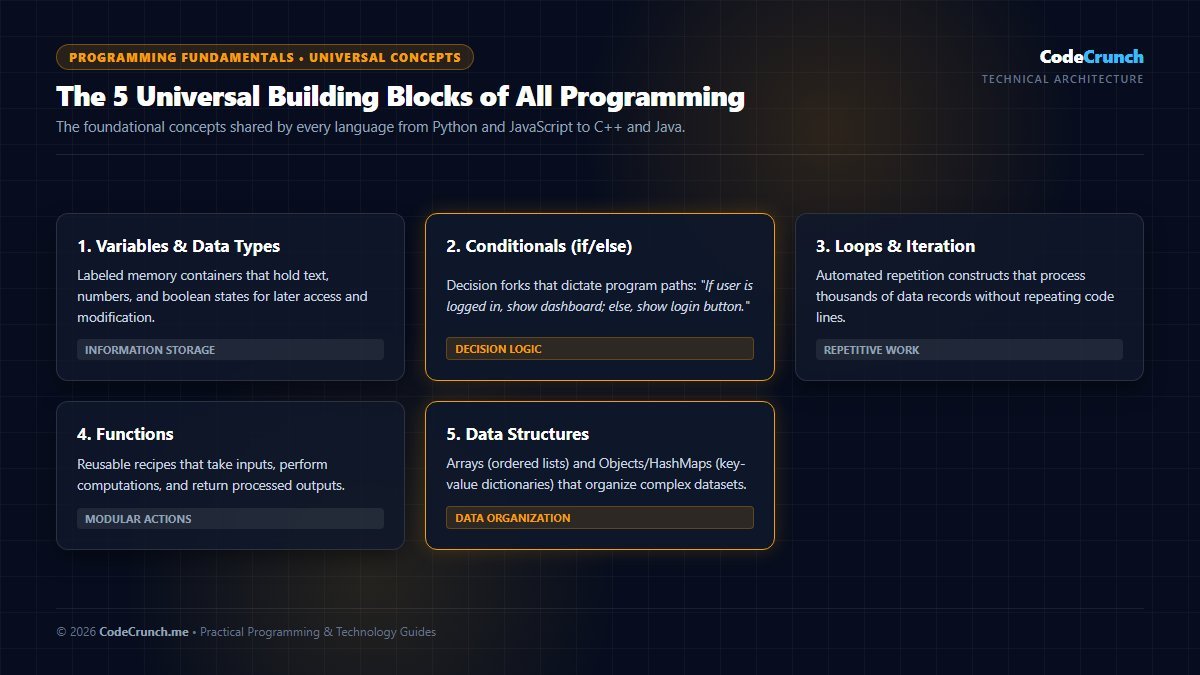
Universal Primitives: Regardless of whether you write in Python, C, Go, or Swift, every computer program ever written is assembled using these five fundamental building blocks: variables, data structures, conditional control flow, loops, and functions.
Deep-Dive: How Interpreters vs JIT Compilers Balance Speed and Flexibility
Modern programmers frequently interact with two primary execution paradigms:
- Ahead-of-Time (AOT) Compilers: Languages like C++, Rust, and Go are compiled directly into machine instructions before execution. The compiler analyzes the entire codebase, performing dead-code elimination, loop unrolling, and memory optimization. The resulting binary executes natively at maximum hardware speed with zero runtime overhead.
- Just-in-Time (JIT) Compilers: Modern engines like Google Chrome’s V8 (JavaScript) and the Java Virtual Machine (JVM) combine the flexibility of dynamic interpretation with compiler performance. Code begins execution in a fast interpreter. As functions execute repeatedly (“hot code”), the JIT engine compiles those specific execution paths directly into optimized machine code in real time.
Understanding this hardware translation pipeline demystifies performance optimization and empowers you to write efficient code across any programming language. For deeper academic foundations, explore the official Python Software Foundation Overview and MDN Web Docs Programming Fundamentals.
Regardless of whether you write in Python, JavaScript, C++, or Go, virtually every program in existence is constructed from five fundamental concepts:
1. Variables (Memory Storage)
Variables store data values that your program can read, manipulate, and update during execution—such as a user’s account balance, high score, or email address. Read our deep-dive on JavaScript variables explained easily.
2. Conditionals (Decision Making)
Conditionals allow programs to make decisions based on specific criteria using if / else statements:
if user_age >= 18:
    print("Access granted.")
else:
    print("Access denied. Minimum age is 18.")
3. Loops (Repetition & Iteration)
Computers excel at repetitive tasks. Loops execute a block of code repeatedly until a condition is satisfied (e.g., sending an email notification to 10,000 newsletter subscribers one by one).
4. Functions (Reusable Procedures)
Functions bundle a sequence of instructions into a reusable block. Rather than rewriting the same calculation 50 times across your codebase, you define a function once and call it whenever needed with different inputs.
5. Data Structures (Organized Collections)
Data structures organize collections of information—such as ordered lists (arrays) or key-value dictionaries (hash maps)—allowing fast searching, sorting, and indexing.
4. How Code Executes: From Human Syntax to Binary Ones and Zeros
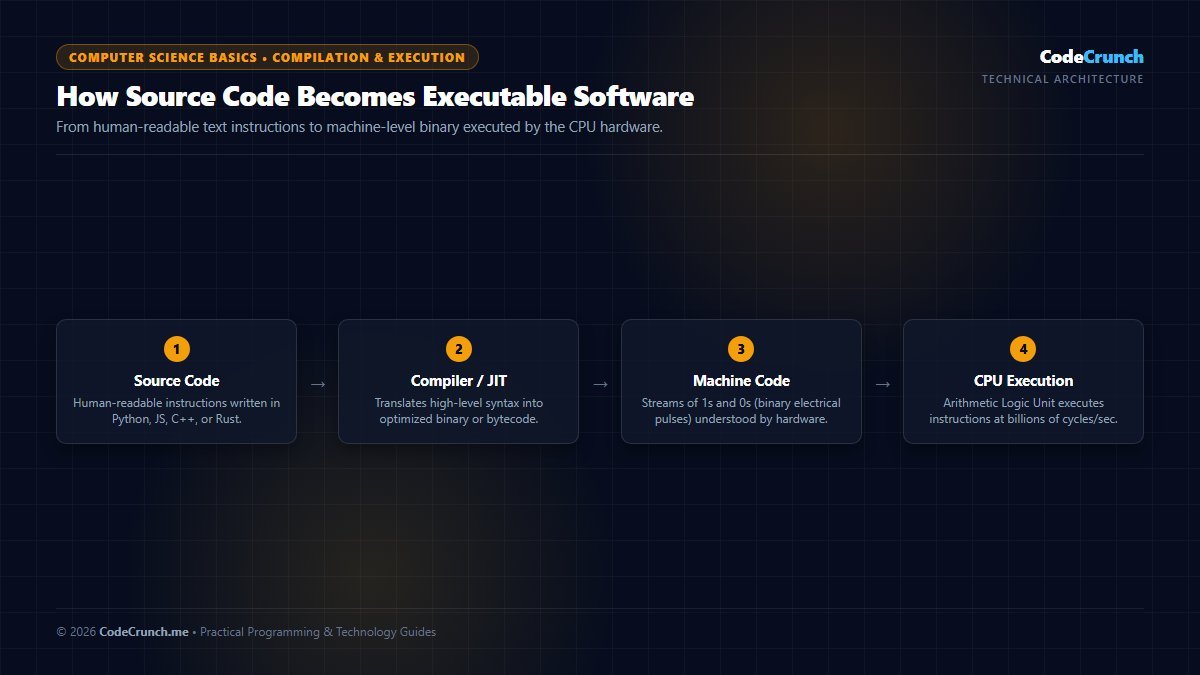
Compilation and Execution Pipeline: As illustrated above, high-level code written in languages like C++, Java, or Rust cannot be executed directly by silicon. Compilers and interpreters transform human syntax into abstract syntax trees (ASTs), intermediate bytecode, and finally machine code consisting of binary instructions and CPU register operations.
Underneath keyboard keys and glass displays, computer microprocessors (CPUs) do not understand English words like print or if. CPUs are electronic circuits composed of billions of microscopic transistors that only recognize two electrical states: voltage on (1) or voltage off (0). This is binary machine code.
Because writing billions of ones and zeros by hand is completely impractical for human brains, computer scientists invented high-level programming languages. High-level languages allow humans to write instructions using English keywords, mathematical operators, and structured syntax that is subsequently converted into machine bytecode.
5. Compilers vs Interpreters Explained
To convert human-readable source code into CPU-executable binary, software relies on two primary translation engines:
| Feature | Compiled Languages | Interpreted Languages |
|---|---|---|
| Translation Timing | Translates the entire codebase into standalone machine code binaries ahead of time. | Translates and executes instructions line by line on the fly at runtime. |
| Execution Speed | Extremely fast; CPU directly executes native machine instructions. | Slightly slower due to runtime interpretation overhead. |
| Error Detection | Syntax and type errors are caught during compilation before running. | Errors are discovered as the interpreter encounters the line during execution. |
| Examples | C, C++, Rust, Go. | Python, JavaScript, Ruby, PHP. |
6. Popular Programming Languages Compared
Different programming languages are engineered for different domains. Here are the most prominent languages in 2026:
- Python: Renowned for clean, human-readable syntax. The primary industry standard for data science, artificial intelligence, machine learning, and rapid scripting.
- JavaScript / TypeScript: The official language of the web browser. Powers interactive client-side interfaces and cloud server runtimes (Node.js). Review the skills required in our frontend developer roadmap.
- Java & C#: Enterprise-grade object-oriented languages dominating large corporate backends, Android app development, and financial banking systems.
- C++ & Rust: Blazing-fast systems languages delivering direct memory management. Used in AAA video game engines, operating systems, and high-frequency trading.
- SQL: The standard language for querying, filtering, and persisting data in relational database management systems. Explore our primer on backend basics and SQL databases.
7. Code in Action: “Hello World” Across Three Languages
In software development tradition, the first program written in any new language prints the greeting “Hello, World!” to the screen. Observe how syntax compares across three languages:
1. Python
print("Hello, World!")2. JavaScript (Browser Console)
console.log("Hello, World!");3. C++
#include <iostream>

int main() {
    std::cout << "Hello, World!" << std::endl;
    return 0;
}
8. Real-World Applications: Where Programming Powers Society
Software is the operational foundation of the modern global economy:
- Web and Cloud Platforms: Everything from search engines to cloud storage systems that transfer terabytes of data daily. Learn how the web operates in our tutorial on how websites work step-by-step.
- Automotive and Aerospace: Modern electric vehicles run over 100 million lines of embedded safety and powertrain code.
- Healthcare & Medicine: MRI diagnostic imaging, robotic surgery systems, and genome sequencing algorithms rely on high-performance mathematical software.
- Financial Networks: Global stock exchanges, fraud detection algorithms, and automated ATM banking networks.
9. How Beginners Can Start Coding Today
If you want to learn programming from scratch, you do not need expensive degrees or advanced calculus skills. Follow these concrete steps:
- Pick One Language and Stick to It: We recommend Python for general software logic or JavaScript for web development. Avoid hopping between languages during your first three months.
- Code Every Single Day: Thirty minutes of hands-on daily typing builds muscle memory far more effectively than a 6-hour marathon once per week.
- Build Real Projects: Do not get stuck passively watching video tutorials. Build small, working projects: a command-line calculator, an expense tracker, or a basic portfolio website. Follow our tutorial on how to build a simple website using HTML and CSS.
- Learn How to Read Error Messages: Errors are not failures—they are clues. Learning to decipher tracebacks and search diagnostic documentation on Stack Overflow is the mark of a true software engineer.
For a complete breakdown of zero-cost interactive platforms, compilers, and learning paths, explore our guide on how to start coding at home for free. If you need a reliable, cost-effective laptop for development, check out our curated guide to the best budget laptops for work and study.
10. Frequently Asked Questions (FAQ)
Is programming difficult for complete beginners?
Learning programming can feel challenging at first because it requires thinking in precise, step-by-step logic. However, with consistent daily practice and practical projects, the core principles quickly become intuitive and rewarding.
Do I need advanced math to learn to code?
No. Standard web development, app development, and software engineering rely on basic arithmetic, logic, and problem decomposition rather than advanced trigonometry or calculus.
How long does it take to learn programming fundamentals?
With 45–60 minutes of focused practice per day, most beginners understand variables, loops, conditionals, and basic functions within 4 to 8 weeks.