
Whenever you type a URL into your browser, hit Enter, and watch a webpage materialize within a fraction of a second, an astonishingly intricate symphony of global networking protocols, DNS lookups, cryptographic handshakes, and browser rendering engines executes behind the scenes. But how do websites work step-by-step in real life?
Whether you are an aspiring software engineer or simply a curious technology enthusiast, understanding the mechanics of the web demystifies modern digital infrastructure. In this comprehensive, step-by-step guide, we track the complete lifecycle of a web request—from keystroke and DNS resolution to the TCP/TLS handshake, server processing, and the browser’s internal Critical Rendering Path.
Table of Contents
- 1. The 500-Millisecond Journey: An Overview
- 2. Anatomy of a URL: What Your Browser Actually Reads
- 3. DNS Resolution: The Internet’s Distributed Phonebook
- 4. Establishing Connection: TCP & TLS 1.3 Handshake
- 5. The HTTP/HTTPS Request and Server Processing
- 6. Static Files vs Dynamic Applications (The Database Layer)
- 7. Inside the Browser: The Critical Rendering Path (CRP)
- 8. Where Websites Live: Servers, Clouds, and CDNs
- 9. Quick Summary & Recommended Next Steps
- 10. Frequently Asked Questions (FAQ)
1. The 500-Millisecond Journey: An Overview
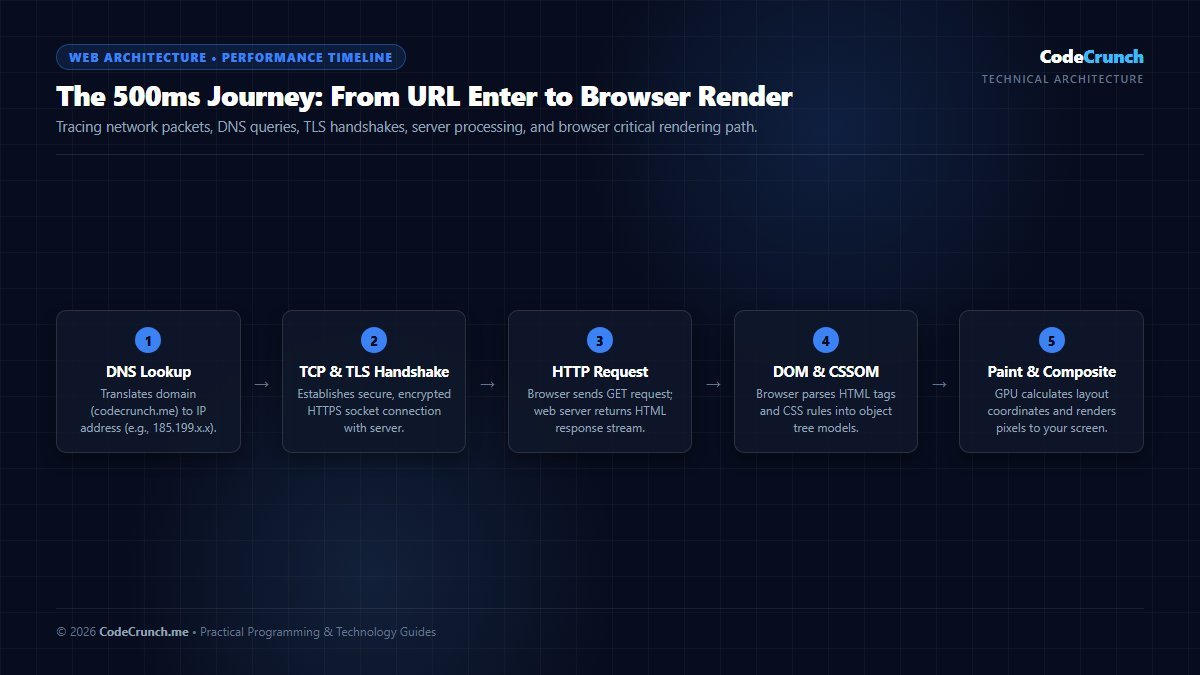
Sub-Second Network Pipeline: Within the first 500 milliseconds of hitting Enter, your computer traverses DNS resolution, TCP three-way handshake, TLS 1.3 cryptographic key negotiation, server processing, and browser DOM/CSSOM tree construction.
When you request a webpage like https://www.codecrunch.me/, your computer and remote servers execute a sequence of five distinct engineering phases in roughly 200 to 600 milliseconds:
- URL Parsing & DNS Translation: Converting the human-readable domain into a numerical IP address.
- TCP & TLS Encryption Handshake: Opening a reliable, cryptographically secure transmission tunnel.
- HTTP Data Request: Asking the destination server for the document payload.
- Server Execution & Response: Processing business logic, querying databases, and streaming back HTML.
- Browser Parsing & Painting: Parsing HTML, CSS, and JavaScript into interactive pixels on your screen.
To see how professional developers specialize across these different layers, check out our guide on what does a web developer do.
2. Anatomy of a URL: What Your Browser Actually Reads
A Uniform Resource Locator (URL) is not just a label—it is an address string that tells your browser which network protocol to initiate, which host to locate, and which resource to retrieve:
https://www.codecrunch.me:443/articles/web-dev/?sort=recent#top
└──┬──┘ └────────┬──────┘ └─┬─┘ └──────┬─────┘ └─────┬─────┘ └─┬─┘
Protocol Hostname Port Path Query Fragment- Protocol (Scheme):
https://specifies HTTP over Transport Layer Security (TLS), guaranteeing data encryption. - Hostname (Domain): The human-friendly identifier (e.g.,
www.codecrunch.me). - Port: The network doorway (port 443 for HTTPS, port 80 for unencrypted HTTP). Browsers hide this by default.
- Path: The hierarchical location of the requested file or REST resource on the server.
- Query String (
?sort=recent): Parameter key-value pairs passed to the application backend. - Fragment (
#top): A client-side anchor that jumps directly to an internal element on the page.
3. DNS Resolution: The Internet’s Distributed Phonebook
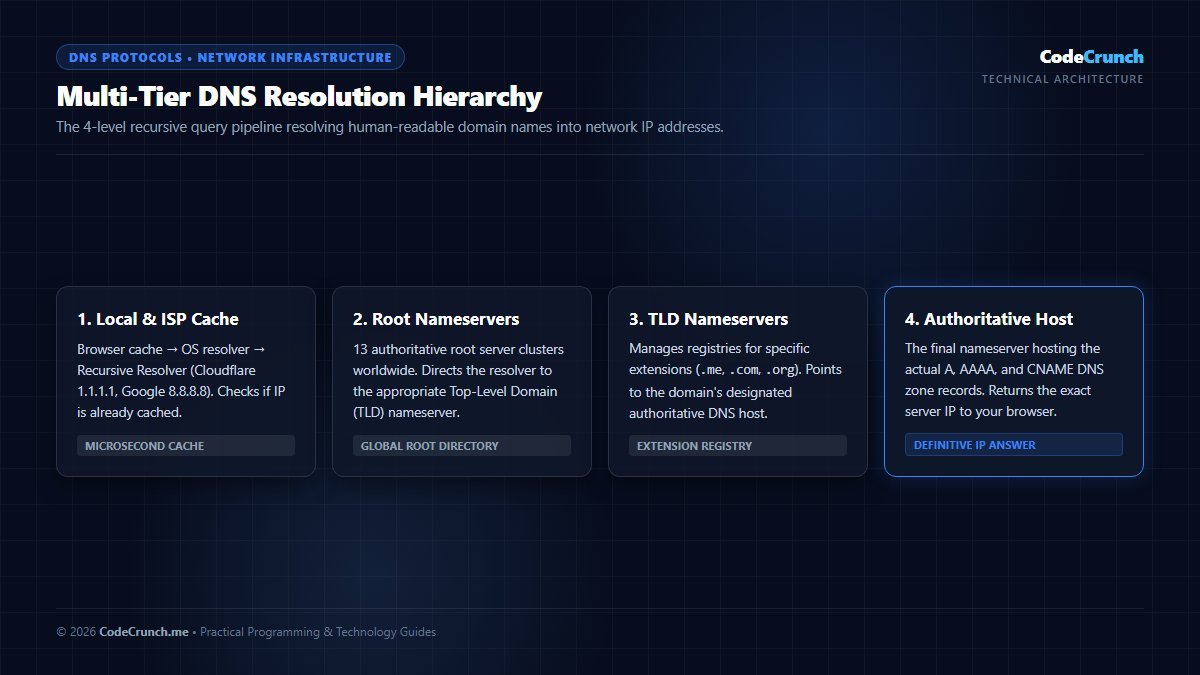
Hierarchical DNS Architecture: When a domain is requested, queries cascade through Browser Cache, OS Resolver, Local ISP Recursive Resolver, Root Nameservers (.), Top-Level Domain (TLD) Nameservers (.com/.me), and finally the Authoritative Nameserver hosting the actual A/AAAA DNS records. For fundamental protocol documentation, review IETF RFC 1035 (Domain Names Implementation) and MDN Critical Rendering Path.
Computers communicate across global networks using Internet Protocol (IP) addresses—such as 104.21.56.89 (IPv4) or 2606:4700:3033::6815:3859 (IPv6). Because humans cannot remember long strings of numbers, the Domain Name System (DNS) translates domain names into numerical routing coordinates.
When you submit a new URL, the DNS lookup searches through a hierarchy of caches:
- Browser DNS Cache: Chrome or Firefox checks its local memory cache of recently resolved sites.
- Operating System Cache: If absent, the OS checks its local resolver cache and
hostsconfiguration. - Recursive Resolver (ISP or Public DNS): Your query reaches your ISP resolver or public DNS (such as Cloudflare
1.1.1.1or Google8.8.8.8). - Root Nameserver (
.): The root server directs the query to the Top-Level Domain (TLD) server handling.meor.com. - TLD Nameserver: Directs the resolver to the authoritative nameserver responsible for the specific domain.
- Authoritative Nameserver: Returns the definitive IP address record (an “A” record for IPv4 or “AAAA” for IPv6).
For network troubleshooting and resolving local DNS cache anomalies, explore our comprehensive guide on fixing Wi-Fi disconnecting and DNS lookup issues.
4. Establishing Connection: TCP & TLS 1.3 Handshake
Once the browser knows the target server’s IP address, it cannot simply blast data over the wire. It must establish a reliable, encrypted transmission channel using standard IETF networking protocols.
1. The TCP 3-Way Handshake
Transmission Control Protocol (TCP) guarantees that packets arrive in order and without corrupted bytes:
- SYN (Synchronize): The browser sends a synchronization packet containing an initial sequence number.
- SYN-ACK (Synchronize-Acknowledge): The remote server acknowledges receipt and sends its own sequence number.
- ACK (Acknowledge): The browser acknowledges the server, and the connection is officially established.
2. The TLS 1.3 Cryptographic Handshake
Immediately following TCP establishment, the browser and server initiate TLS 1.3 encryption to protect user credentials, credit cards, and private data from packet-sniffing eavesdroppers:
- The client sends supported cipher suites.
- The server provides its public TLS certificate issued by an authorized Certificate Authority (such as Let’s Encrypt).
- Both sides calculate a shared symmetric encryption session key using Diffie-Hellman ephemeral key exchange. From that moment forward, 100% of network traffic is encrypted.
5. The HTTP/HTTPS Request and Server Processing
With an encrypted tunnel active, the browser dispatches an HTTP request. Under modern HTTP/2 or HTTP/3 (QUIC), requests and responses are multiplexed as binary streams over a single connection.
GET /articles/web-dev/ HTTP/2
Host: www.codecrunch.me
User-Agent: Mozilla/5.0 (Windows NT 10.0; Win64; x64)
Accept: text/html,application/xhtml+xml
Accept-Encoding: gzip, deflate, br
When the host receives this request, the web server (such as LiteSpeed, NGINX, or Apache) inspects the requested resource and responds with standard HTTP status codes:
200 OK— The document exists and is enclosed in the payload.301 Moved Permanently— Redirects the client to a new canonical URL.404 Not Found— The requested path does not exist on the server.500 Internal Server Error— The backend server application crashed or threw an unhandled exception.
Read the definitive MDN HTTP Documentation to explore all HTTP methods, headers, and response status codes.
6. Static Files vs Dynamic Applications (The Database Layer)
How the server produces the response depends on the architecture of the website:
Static Websites
On static sites, HTML files, CSS stylesheets, and images are stored pre-built directly on the disk or distributed globally across Content Delivery Networks (CDNs). The web server simply reads the file from storage and streams it over the network. Static sites deliver blazing speed and minimal server overhead.
Dynamic Websites & Applications
On dynamic platforms (like WordPress, e-commerce stores, and social networks), the requested URL does not correspond to a static HTML file on disk. Instead, an application runtime (PHP, Node.js, Python, or Go) executes application logic, queries relational SQL or NoSQL databases, verifies user authentication, and dynamically composes an HTML document on the fly.
To dive deeper into how server engines, queries, and security layers operate, read our complete guide on backend basics explained simply.
7. Inside the Browser: The Critical Rendering Path (CRP)
Once the browser receives the raw HTML byte stream from the server, the engineering marvel known as the Critical Rendering Path begins inside the browser’s layout engine (Blink in Chrome/Edge, Gecko in Firefox, WebKit in Safari):
- DOM Construction (Document Object Model): The browser converts raw bytes into characters, tokens, and finally a hierarchical tree of C++ nodes representing every element on the page. Learn about foundational markup in our guide to HTML tags explained for beginners.
- CSSOM Construction (CSS Object Model): The browser parses all external and inline CSS rules, calculating cascading specificity to build the styling tree. Explore how selectors target nodes in our tutorial on CSS selectors made simple.
- Render Tree Generation: The DOM and CSSOM combine into the Render Tree, discarding invisible elements (such as
<head>or elements withdisplay: none). - Layout (Reflow): The browser computes the exact geometry and pixel coordinates of each visible element relative to the device viewport.
- Paint & Composite: Pixels are drawn into GPU memory layers and composited onto the user’s screen.
Detailed performance benchmarks on the rendering pipeline can be found in the MDN Critical Rendering Path Guide.
8. Where Websites Live: Servers, Clouds, and CDNs
Modern web infrastructure utilizes three primary deployment tiers to ensure websites stay online 24 hours a day, 365 days a year:
| Infrastructure Tier | Primary Function | Examples | Key Benefit |
|---|---|---|---|
| Origin Server | Runs application code, connects to primary databases, generates dynamic HTML. | Hostinger, AWS EC2, DigitalOcean Droplets. | Complete control over software dependencies and database storage. |
| Content Delivery Network (CDN) | Caches static HTML, CSS, images, and fonts across hundreds of edge locations globally. | Cloudflare, Fastly, AWS CloudFront. | Serves content from servers physically closest to the user, dropping latency from 300ms to 15ms. |
| Managed Database Cluster | Provides isolated, backed-up, highly available relational data persistence. | AWS RDS, Google Cloud SQL, Supabase. | Automated failovers, point-in-time backups, and high concurrency. |
9. Quick Summary & Recommended Next Steps
To recap: when you access any website, you initiate a chain of interconnected engineering systems:
- DNS resolves the human domain name into a numerical IP routing destination.
- TCP & TLS establish an orderly, cryptographically secure connection.
- HTTP communicates the client’s request to the origin server or edge CDN.
- Server & Database retrieve assets or execute backend code to stream the HTML payload.
- Browser Rendering Engine executes the Critical Rendering Path (DOM → CSSOM → Render Tree → Layout → Paint).
Now that you grasp the complete network picture, start building your own web applications with our step-by-step tutorial on how to build a simple website using HTML and CSS, and review the foundational capabilities required in our guide to frontend developer skills for beginners in 2026.
10. Frequently Asked Questions (FAQ)
Do all websites require a database to work?
No. Simple static websites composed strictly of HTML, CSS, JavaScript, and static images do not require a database. A database is only needed when applications store dynamic user profiles, blog posts, transactions, or state across sessions.
What is the difference between HTTP and HTTPS?
HTTP transmits data in clear, unencrypted plaintext across the internet, making it vulnerable to interception. HTTPS wraps HTTP traffic in Transport Layer Security (TLS), encrypting data between the browser and server so third parties cannot view or tamper with passwords, credit card numbers, or session cookies.
Why do some websites load much faster than others?
Website speed depends on server response time (TTFB), asset optimization (compressing modern WebP/AVIF images, minifying CSS and JavaScript), server caching (LiteSpeed/Redis), and whether the site leverages an edge Content Delivery Network (CDN) like Cloudflare.